> ## Documentation Index
> Fetch the complete documentation index at: https://trigger-v3-trigger-api-redesign.mintlify.site/llms.txt
> Use this file to discover all available pages before exploring further.
# The trigger.config.ts file
> This file is used to configure your project and how it's bundled.
Let's take a look at a basic `trigger.config.ts` file. This is generated for you when you follow [the quick start guide](/v3/quick-start). This file is used to configure your project and how it's bundled.
```ts trigger.config.ts
import type { TriggerConfig } from "@trigger.dev/sdk/v3";
export const config: TriggerConfig = {
//Your project ref (you can see it on the Project settings page in the dashboard)
project: "proj_gtcwttqhhtlasxgfuhxs",
retries: {
//If you want to retry a task in dev mode (when using the CLI)
enabledInDev: false,
//the default retry settings. Used if you don't specify on a task.
default: {
maxAttempts: 3,
minTimeoutInMs: 1000,
maxTimeoutInMs: 10000,
factor: 2,
randomize: true,
},
},
//The paths for your trigger folders
triggerDirectories: ["./trigger"],
};
```
Most of the time you don't need to change anything in this file, or if you do then we will tell you when you the run the CLI command.
## Instrumentations
We use OpenTelemetry (OTEL) for our run logs. This means you get a lot of information about your tasks with no effort. But you probably want to add more information to your logs. For example, here's all the Prisma calls automatically logged:
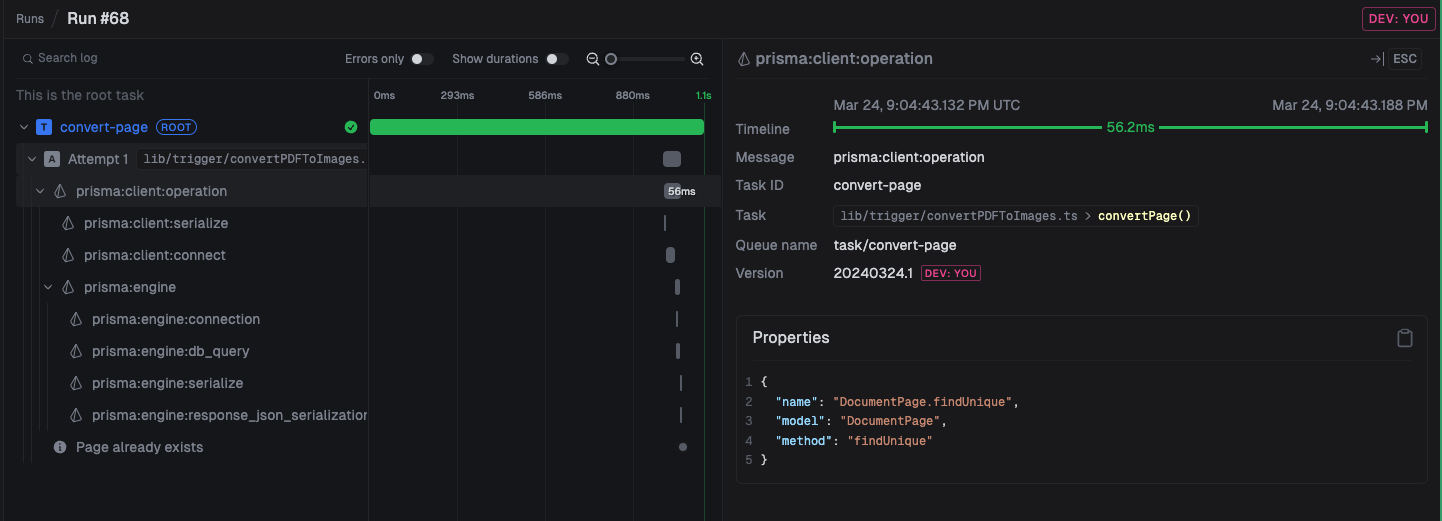
Here we add Prisma and OpenAI instrumentations to your `trigger.config.ts` file.
```ts trigger.config.ts
import type { TriggerConfig } from "@trigger.dev/sdk/v3";
import { PrismaInstrumentation } from "@prisma/instrumentation";
import { OpenAIInstrumentation } from "@traceloop/instrumentation-openai";
export const config: TriggerConfig = {
//..other stuff
instrumentations: [new PrismaInstrumentation(), new OpenAIInstrumentation()],
};
```
## ESM-only packages
We'll let you know when run the CLI dev command if this is a problem. Some packages are ESM-only so they don't work directly from CJS when using Node.js. In that case you need to add them to the `dependenciesToBundle` array in your `trigger.config.ts` file.
```ts trigger.config.ts
import type { TriggerConfig } from "@trigger.dev/sdk/v3";
export const config: TriggerConfig = {
//..other stuff
//either regex or strings of package names
dependenciesToBundle: [/@sindresorhus/, "escape-string-regexp"],
};
```
## Prisma (and other generators)
```bash
✘ [ERROR] Error: @prisma/client did not initialize yet. Please run "prisma generate" and try to import it again.
In case this error is unexpected for you, please report it in
https://pris.ly/prisma-prisma-bug-report
at new PrismaClient (/app/node_modules/.prisma/client/default.js:43:11)
at Object. (/lib/prisma.ts:7:33)
at Module.\_compile (node:internal/modules/cjs/loader:1356:14)
at Object.Module.\_extensions..js (node:internal/modules/cjs/loader:1414:10)
at Module.load (node:internal/modules/cjs/loader:1197:32)
at Function.Module.\_load (node:internal/modules/cjs/loader:1013:12)
at Function.executeUserEntryPoint [as runMain] (node:internal/modules/run_main:128:12)
at node:internal/main/run_main_module:28:49
```
Prisma works by generating a client from your `prisma.schema` file. This means you need to do a couple of things to get it to work with Trigger:
```json
{
"scripts": {
"postinstall": "prisma generate"
}
}
```
Anything you put in `postinstall` will be run as part of the install step. This is how Next.js recommends you set up Prisma anyway.
```ts trigger.config.ts
import type { TriggerConfig } from "@trigger.dev/sdk/v3";
export const config: TriggerConfig = {
//..other stuff
additionalFiles: ["./prisma/schema.prisma"],
additionalPackages: ["prisma@5.11.0"],
};
```
This tells Trigger to bundle the Prisma client and the schema file.
## Troubleshooting
If you have an issue with bundling let us know on [Discord](https://trigger.dev/discord) or [via email](https://trigger.dev/contact).